An AI writing studio for Windows · by ZooLLM

Write Without Friction.

WriteLLM is a desktop writing studio with an AI that understands story, structure, and momentum — powered by your own ZooLLM account. Draft books, essays, journals, documents, and even live spreadsheets, all in one calm workspace.

Windows 10/11 · Free with your ZooLLM account

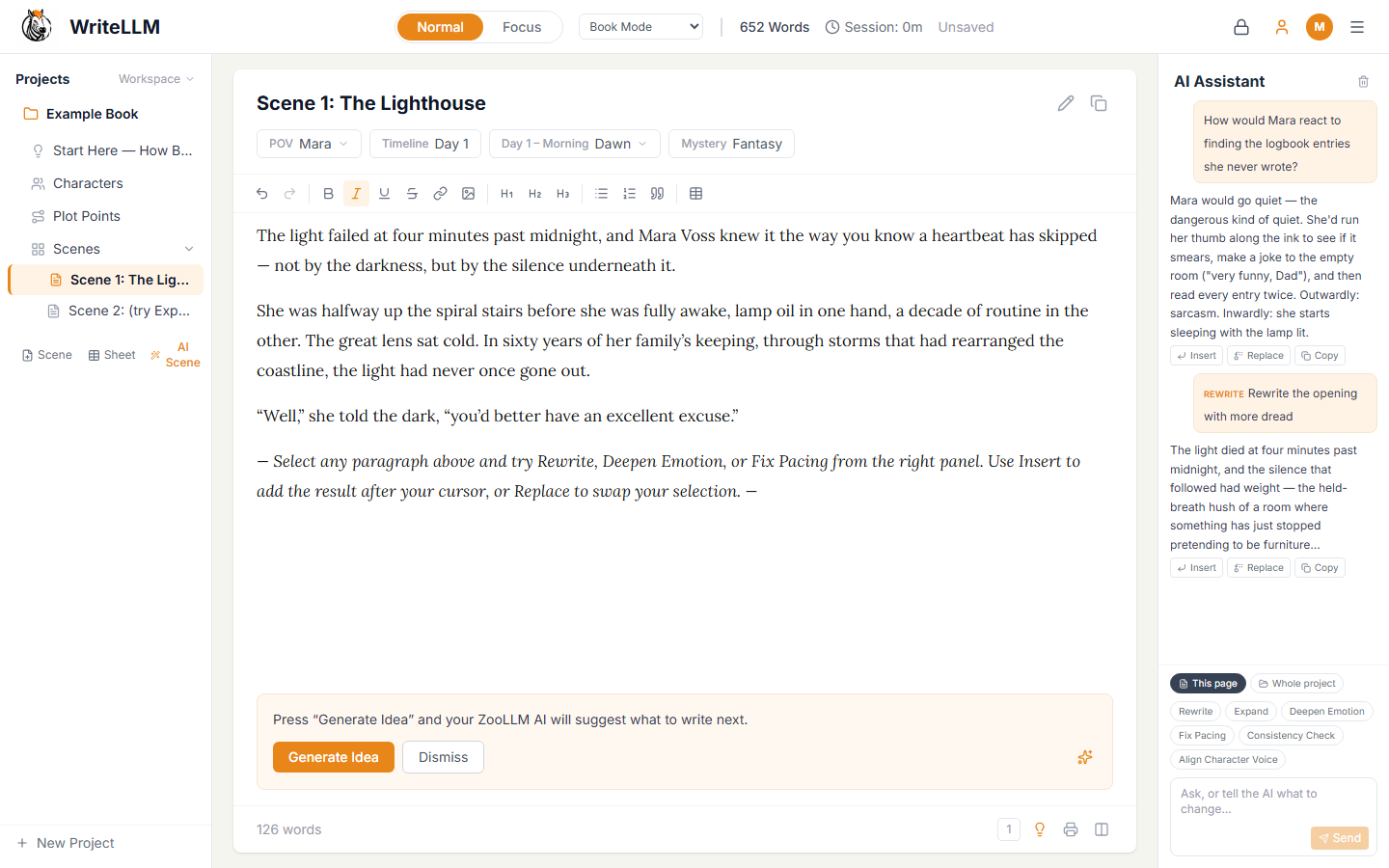
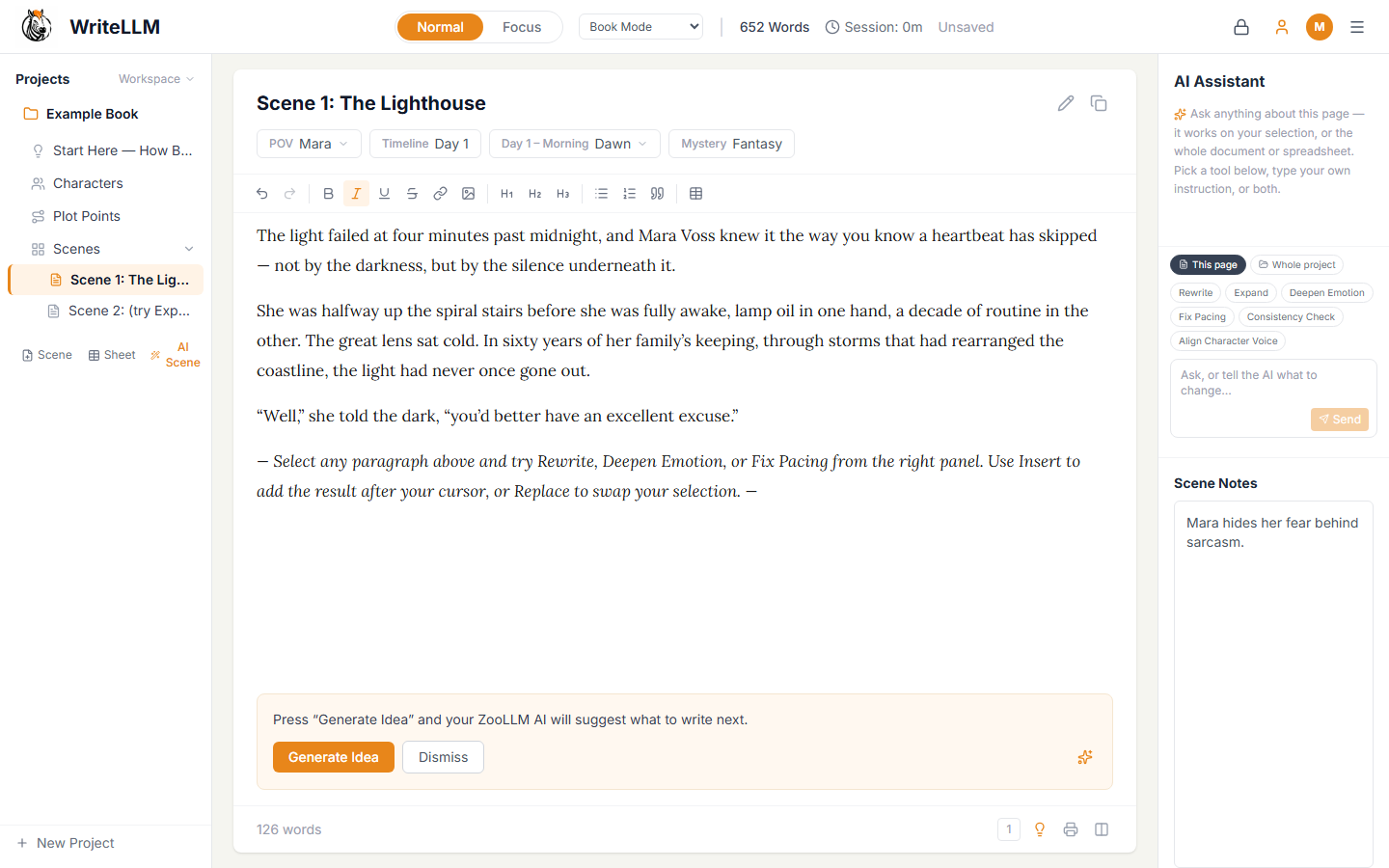
The WriteLLM editor showing a novel scene titled 'Scene 1: The Lighthouse' with POV, timeline, and genre tags, a rich-text toolbar, the project tree of characters, plot points, and scenes on the left, and the AI Assistant panel with Rewrite, Expand, and Deepen Emotion tools on the right.

One studio. Every kind of writing.

Real screenshots from WriteLLM 0.9.0 — this is exactly what you'll open.

Writing modes

Start from the mode that fits the work

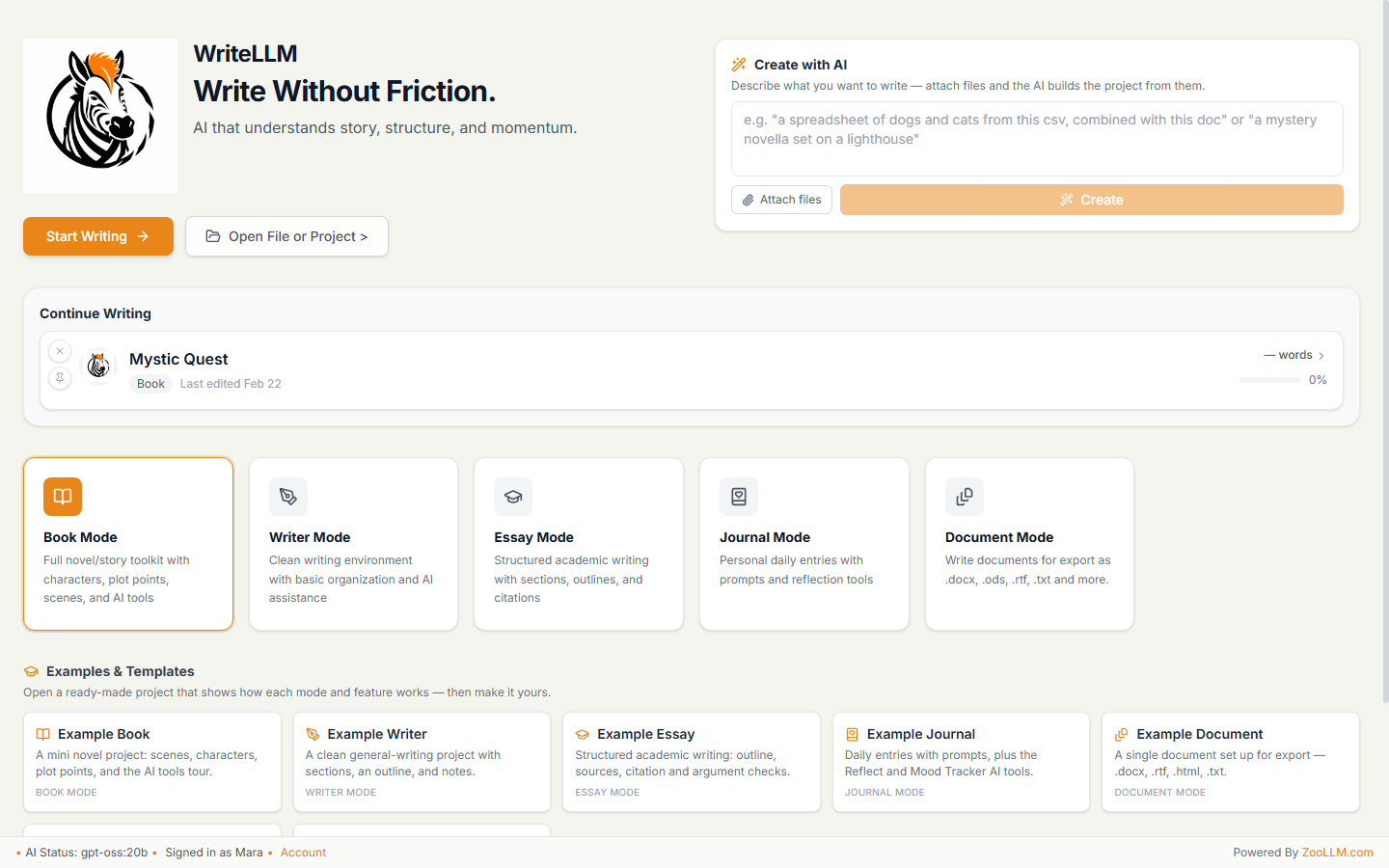
The dashboard gives you five purpose-built modes — Book, Writer, Essay, Journal, and Document — each with its own toolkit, plus example projects that show how everything works. Or type an idea into Create with AI, attach files, and let your ZooLLM AI build the whole project for you.

  • Book mode: scenes, characters, plot points, and AI tools
  • Essay mode: sections, outlines, and citations
  • Create with AI from a prompt — or from your own files
The WriteLLM dashboard with a 'Create with AI' prompt box, a Continue Writing card for a book called Mystic Quest, five mode cards for Book, Writer, Essay, Journal, and Document modes, and a row of example projects and templates.

AI Assistant

An assistant that has actually read your project

Chat with an AI that can work on your selection, the current page, or the whole project. One-tap tool chips — Rewrite, Expand, Deepen Emotion, Fix Pacing, Consistency Check, Align Character Voice — return results you can Insert, Replace, or Copy. Ask "how would Mara react?" and it answers from her character bible, in her voice.

  • Scope any request to selection, page, or whole project
  • Act-as-character answers grounded in your Character Builder
  • Insert or replace AI results without leaving the page
The AI Assistant panel in WriteLLM answering 'How would Mara react to finding the logbook entries she never wrote?' in character, with a Rewrite result below it and Insert, Replace, and Copy buttons, plus tool chips like Rewrite, Expand, Deepen Emotion, and Fix Pacing.

Spreadsheets

Real spreadsheets, right next to your prose

Drop a live sheet into any project — budgets, word-count trackers, research tables. Formulas like =SUM(C2:C5) calculate as you type, and Excel files import and export with formulas intact. The AI can read and edit your sheets just like your text.

  • Live formulas: =SUM, =AVERAGE, references, and more
  • Import .xlsx, .xls, .csv, and .ods — formulas preserved
  • Export back to Excel, ODS, or CSV
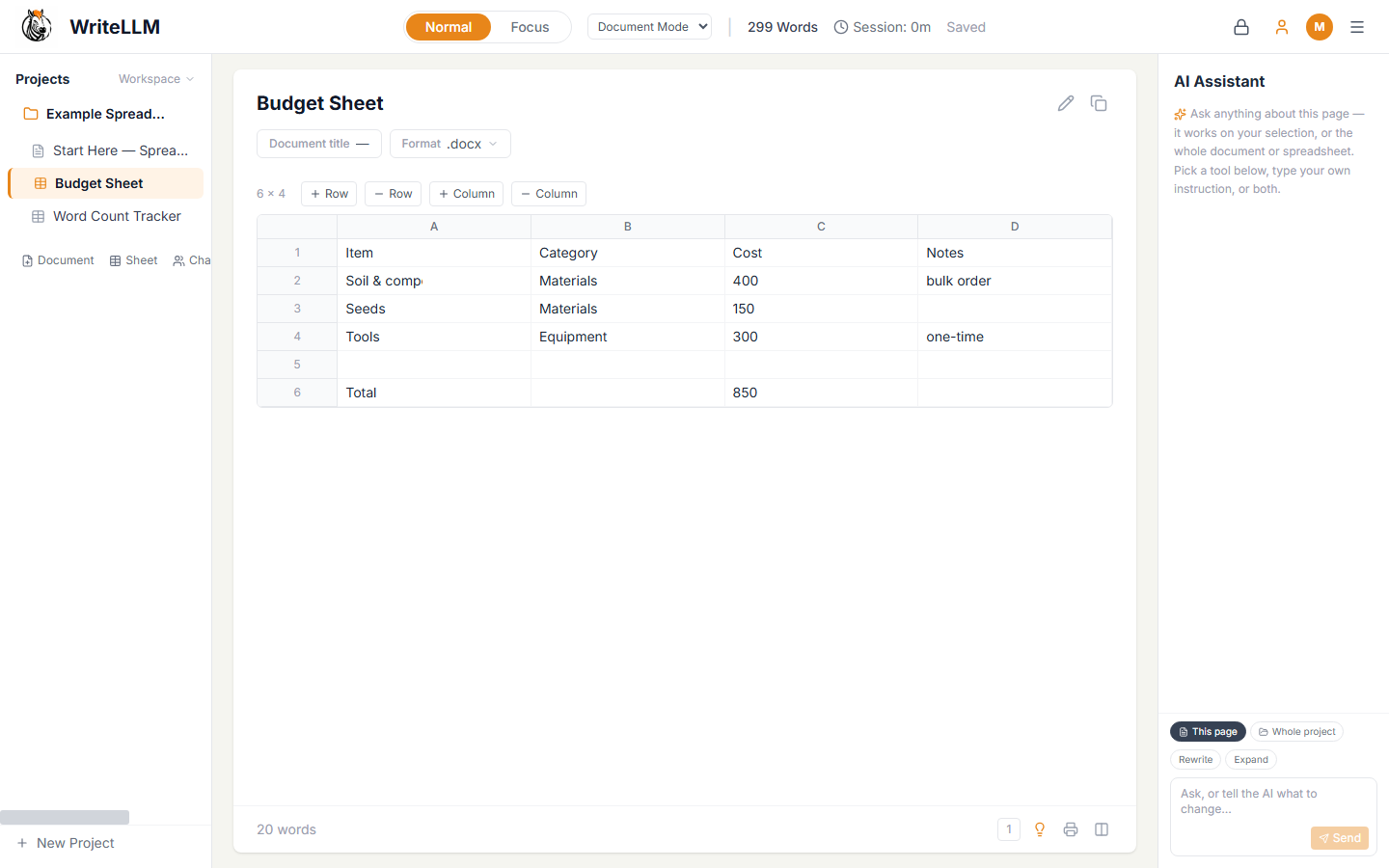
A live Budget Sheet spreadsheet inside WriteLLM with rows for materials, equipment, costs, and a computed Total, plus toolbar buttons to add or remove rows and columns and the AI Assistant panel alongside.

Character Builder

Characters the AI never forgets

Build profiles — role, appearance, personality, voice, motivation, notes — and they're fed to the AI while you write. It keeps dialogue in voice, flags out-of-character moments, and can answer "how would they react?" in the chat. Hit Generate with AI to invent a new character who fits the story you already have.

  • Voice and motivation guide every AI suggestion
  • Consistency checks catch out-of-character lines
  • Generate new characters that fit your cast
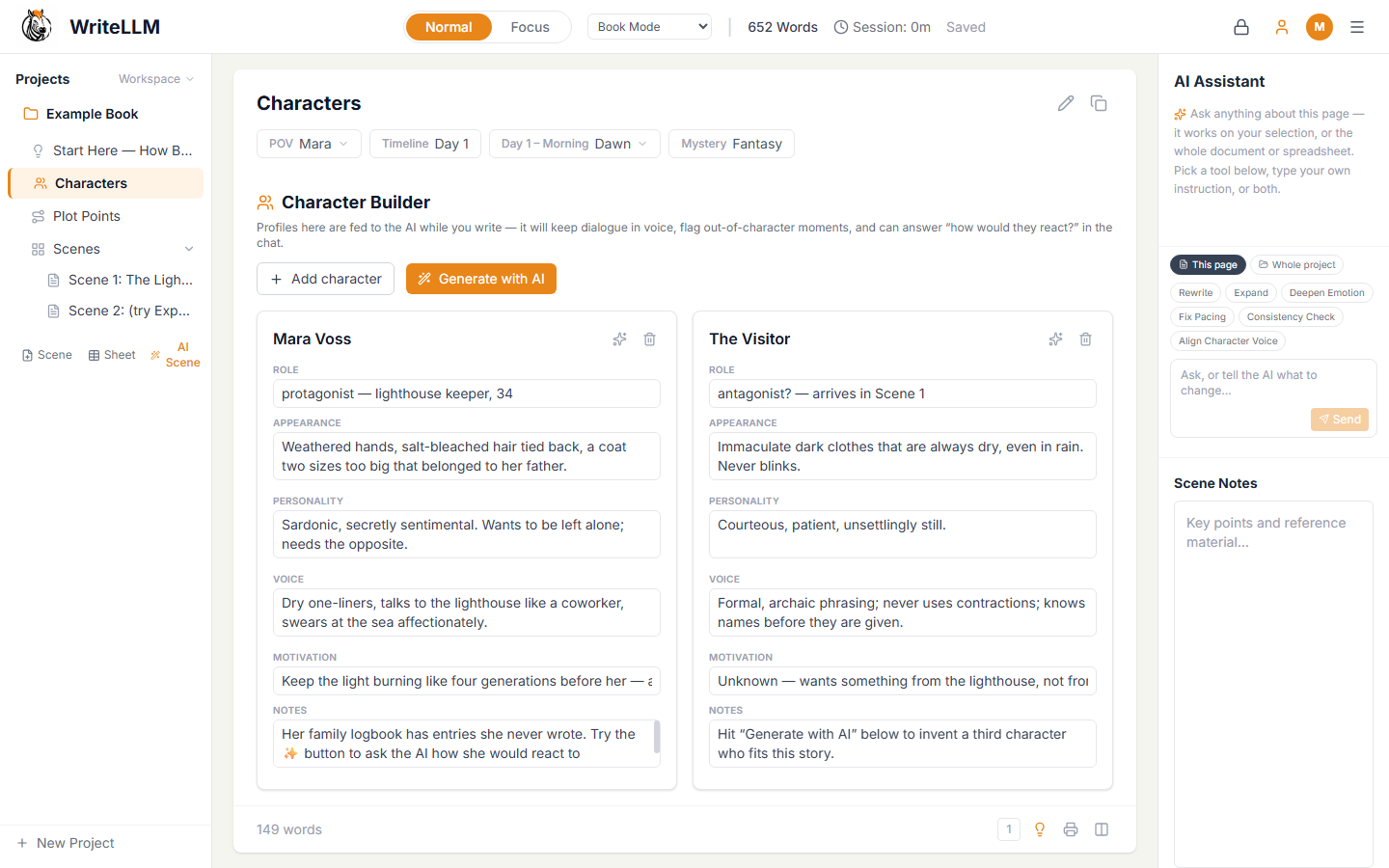
The Character Builder in WriteLLM showing two character profile cards, Mara Voss and The Visitor, each with role, appearance, personality, voice, motivation, and notes fields, plus Add Character and Generate with AI buttons.

Goals & Stats

Momentum you can see

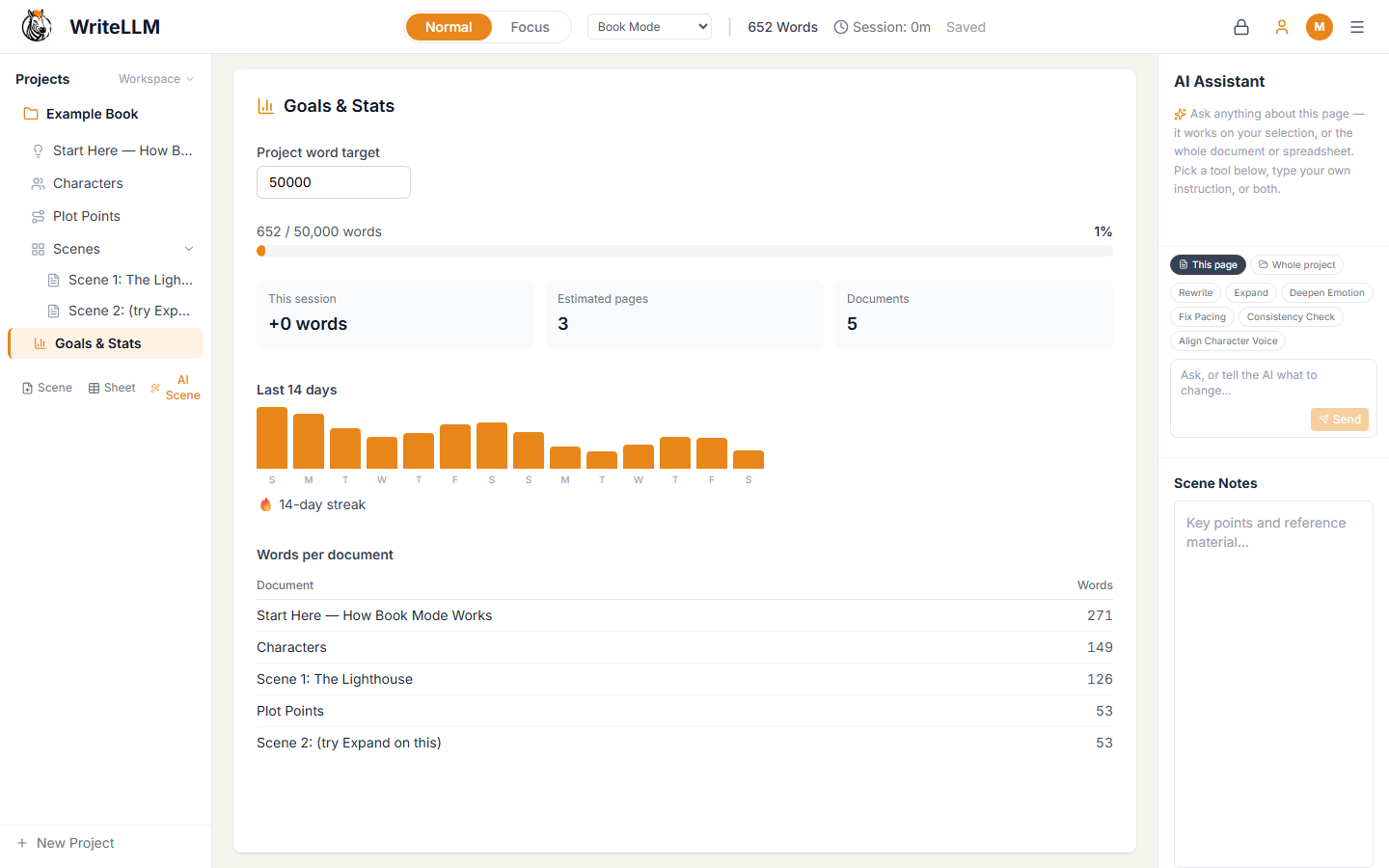
Set a project word target and watch it fill. Goals & Stats tracks words this session, estimated pages, a 14-day writing history, per-document word counts, and your current streak — the quiet scoreboard that keeps a draft moving.

  • Project word targets with live progress
  • 14-day bar chart of your daily output
  • Streaks and per-document breakdowns
The Goals and Stats page in WriteLLM showing a 50,000-word project target with progress bar, session word count, estimated pages, a 14-day bar chart of daily writing, a 14-day streak badge, and a words-per-document table.

Focus mode

When it's time to just write

One click strips the studio down to your words on a calm cream page. Panels, counters, and chrome fade away; the AI waits quietly until you ask. Flip back to Normal mode the moment you need your tools again.

  • Distraction-free, full-width writing canvas
  • AI idea prompts only when you invite them
  • Toggle between Focus and Normal instantly
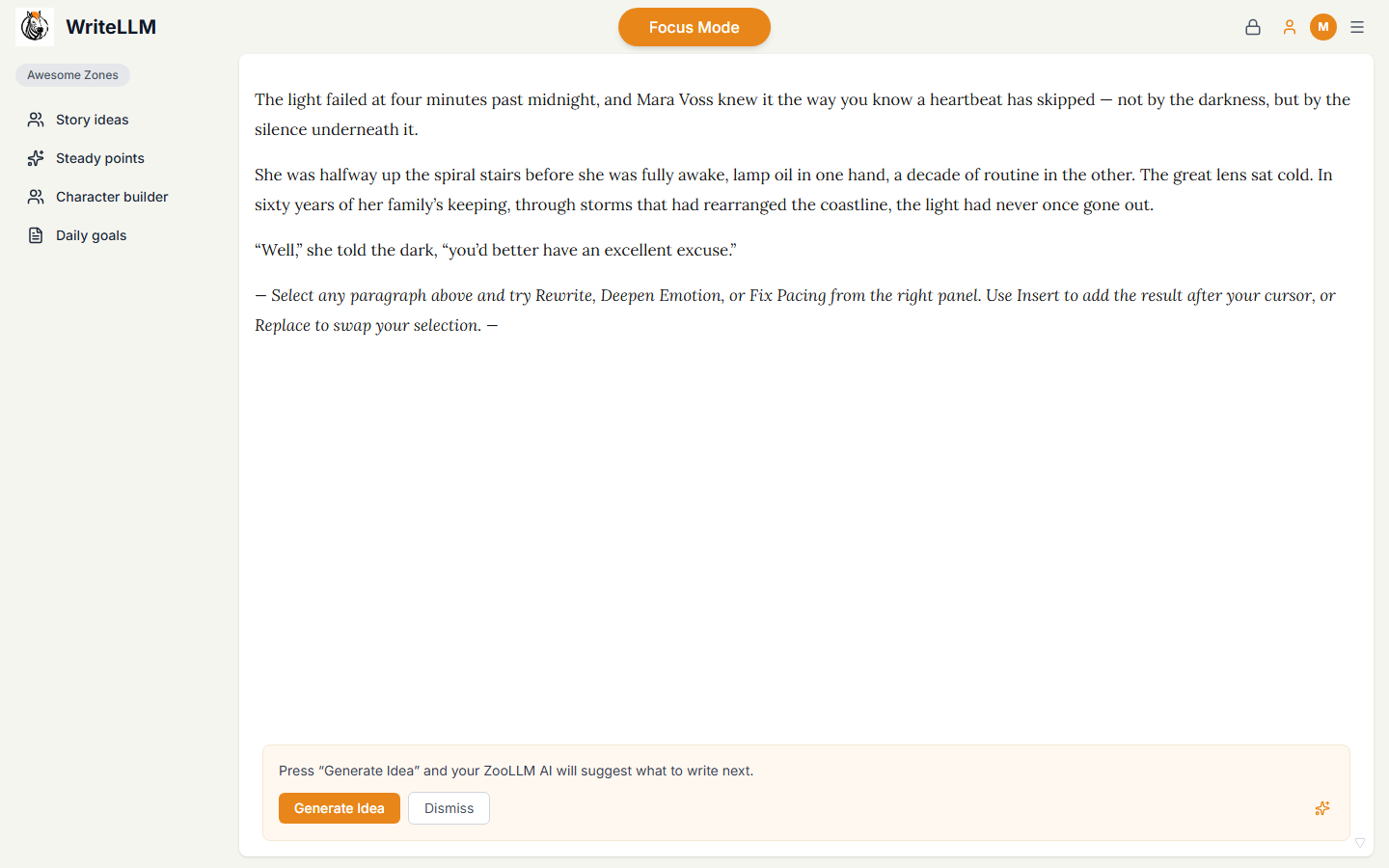
WriteLLM in Focus Mode: a minimal cream-colored screen with only the manuscript text of the lighthouse scene, a slim sidebar of quick zones, and an optional Generate Idea prompt at the bottom.

Everything else you'd hope for

The unglamorous features that make a writing app trustworthy.

Your work, safe by default

Projects live in a single portable .wlm file with timestamped backups and crash recovery — close the lid mid-sentence and pick up where you left off.

Import almost anything

Bring in .docx, .xlsx, .xls, .csv, .ods, .txt, .md, .html, and .rtf files — documents become pages, spreadsheets become live sheets.

Export & Compile Manuscript

Export any page, or compile your whole book into one manuscript — .docx, .rtf, .html, .txt, plus .xlsx, .ods, .csv for sheets.

Right-click AI, anywhere

Select text and right-click for Proofread, Rewrite, or Act as character — quick AI edits without opening the chat panel.

Find & replace

Search across a page or the whole project and replace with confidence — rename a character in every scene at once.

Drag & drop to start

Drop files straight onto the dashboard and WriteLLM turns them into a project — no import wizard required.

A workspace that fits you

Resize the sidebar, editor, and AI panel to taste — wide manuscript, slim notes, or anything in between.

Journal calendar

Journal mode organizes entries on a calendar with daily prompts, reflection tools, and a mood tracker.

Citations built in

Essay mode manages sources and formats citations in APA and MLA, with AI-assisted argument checks.

Your AI, your account

Works with your ZooLLM account — gpt-oss:20b by default, or any provider you've connected through ZooLLM.
Powered by ZooLLM

Sign in with your free ZooLLM.com account and WriteLLM uses your AI — your models, your account, your usage. No separate subscription, no second API key to manage.

Visit ZooLLM.com

WriteLLM 0.9.0 Beta for Windows

Pick an installer — both give you the full studio, free. This is an early public beta.

Beta · Requires Windows 10/11 · Sign in with your free ZooLLM account